


You can make a pet memorial collage with just a few things: one clear photo, your pet’s name, dates, and a short message. Most free templates work best in 5×7, 8×10, and 11×14 inches, and for print, I’d use 300 DPI or higher so the final piece stays sharp.
If I wanted to keep this simple, I’d focus on four choices first:
- Print layouts for framed keepsakes at home
- Digital layouts for posts, Stories, and sharing with family
- Art-style layouts for softer or more symbolic designs
- Animated layouts for slideshows and short video tributes
I’d also match the template to:
- How many photos I want to use
- How much text I need space for
- Where I plan to display or share it
- What shape fits the format: square, portrait, or vertical
A few specs matter more than most people think:
- Square social post: 1,000 × 1,000 px
- Vertical Story or video: 1,080 × 1,920 px
- Social pin: 1,000 × 1,500 px
- Print export: 300–600 DPI
The short version: I’d pick the format first, keep the wording brief, use 3–5 photos at most for small screens, and stay with one photo style and one color palette so the tribute feels calm and easy to read.
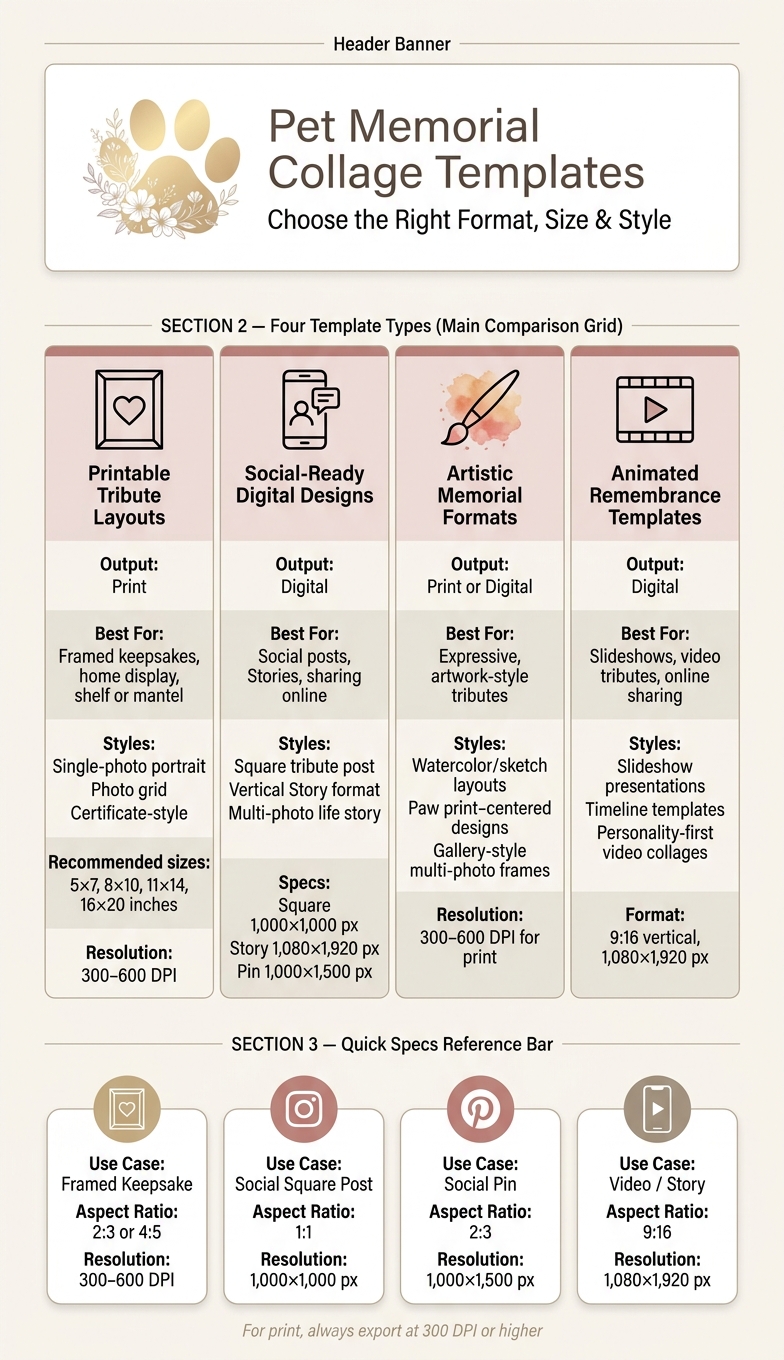
Pet Memorial Collage Templates: Types, Formats & Specs at a Glance
Free General Memorial Photos of Pet Dogs and Pet Photos Collage Memories Slideshow Template-FlexClip
Quick Comparison
| Template Type | Best For | Output |
|---|---|---|
| Printable tribute layouts | Framed display, shelf, bedside table | |
| Social-ready digital designs | Social posts, Stories, sharing online | Digital |
| Art-style memorial formats | Soft portrait look or symbolic tribute | Print or digital |
| Animated remembrance templates | Slideshows, timelines, short videos | Digital |
I see this kind of collage as more than a photo layout. It’s a simple way to keep a pet’s memory in one place, without needing a long message or a complicated design.
What To Look For In A Free Pet Memorial Collage Template
Start with editable text. A good template should let you add your pet’s name, birth and passing dates, and a short message or epitaph. It helps when the name, dates, and tribute line each have their own text field. That way, the layout stays clean and easy to adjust. Simple fonts usually work best because they keep the focus on the photos.
Text should come first. After that, match the template to your photo count and display format.
Next, check how many photos the template can hold. Multi-photo layouts are a smart pick for wall displays because each image can stay clear and centered. Single-portrait layouts are a better fit when you have one standout photo that says everything on its own. In both cases, the template should let you reposition or crop each image so your pet’s face stays centered and easy to see.
For print, use high-resolution PDF or image export at 300 to 600 DPI.
Choose the template based on where you plan to use it. These specs make that part much easier:
| Use Case | Aspect Ratio | Resolution Target |
|---|---|---|
| Framed keepsake | 2:3 or 4:5 | 300–600 DPI |
| Social media post (square) | 1:1 | 1,000 × 1,000 px |
| Social media pin | 2:3 | 1,000 × 1,500 px |
| Video or story tribute | 9:16 | 1,080 × 1,920 px |
This gives you a simple way to compare printable, digital, and animated template types below.
Check the color palette and graphic elements last. Soft, natural backgrounds are usually a safe pick. If the template lets you change the background color, you get more control over the tone and feel. Small touches like paw prints, hearts, or wings can add warmth without taking over the design. The template categories below show how these details work across different formats.
1. Printable tribute layouts
Pick the layout that best matches the story your photos can tell.
Single-photo portrait
Go with one clear, sharp photo that shows your pet’s face well. Then add your pet’s name and dates for a simple keepsake.
Photo grid
A photo grid gives you more room to show your pet’s life across different stages. You can also add one photo of the two of you together to make the tribute feel more personal.
Certificate-style tribute
A certificate-style tribute has a more formal, text-led look. It leaves space for your pet’s name, dates, and a short epitaph.
Here’s a quick comparison of the three print styles.
| Layout Style | Best Use Case | Key Feature |
|---|---|---|
| Single-Photo Portrait | One main photo | Shows your pet's personality |
| Photo Grid | Full life story across life stages | Shows early years through senior years |
| Certificate-Style Tribute | Formal, structured remembrance | Includes name, dates, and a short epitaph |
2. Social-ready digital designs
Free social-ready templates should fit the platform first. After that, match the tribute text and photos.
Square tribute post
A square layout helps you avoid awkward cropping on most social platforms. Use one strong photo, your pet's name, and a short tribute line - something like "Loved, always."
For Stories and Reels, switch to a vertical format that fills the screen.
Vertical Story format
A vertical layout fills the phone screen and works well for a multi-photo collage that shows key stages of life - from puppy or kitten through to their senior years.
Multi-photo life story
Use 3–5 tightly cropped images so each one stays easy to see on a small screen. Keep the background simple. Crop in close to your pet's face so they stay the clear focal point.
For scanned photos, use 300–600 DPI to keep the image sharp enough for cropping without blur.
If you want a more stylized look, move next to artistic memorial formats.
3. Artistic memorial formats
If you want the memorial to feel more like artwork than a standard print, go with an artistic template. These designs use texture and symbolic details to make the tribute feel more expressive.
- Watercolor and sketch-style layouts: Best for a soft portrait look. These layouts work best with a clear, candid photo that shows your pet's expression. Use a high-resolution image so the artwork keeps its detail.
- Paw print–centered designs: Best when the paw print is the main focus. These designs place a paw impression at the center of the tribute. Use a scanned ink print or clay impression to make the layout feel more personal.
- Gallery-style multi-photo frames: Best for a set of favorite images. These frames let you arrange several photos in a clean, artful layout. This format works well when you want to bring a few favorite moments together in one piece.
After you choose a style, add your pet's name, photos, and tribute text.
sbb-itb-c538f2f
4. Animated remembrance templates
If you want the memorial to feel a little more alive, go with motion instead of a static layout. Animated templates can turn still photos into a moving tribute you can share online or play at home. The best format depends on the kind of flow you want: a simple slideshow, a timeline, or a video shaped around your pet’s personality.
- Slideshow presentation templates: Slideshow templates are a good fit for a simple tribute that’s easy to share. Use one clear photo per slide, and keep the text short.
- Timeline templates: These templates work best when the photos follow a clear chronological flow. Short text overlays - a name, birth year, and year of passing - can help anchor the story without cluttering the screen.
- Personality-first video collages: Instead of posed shots, these templates are built around photos that show your pet in motion - playing, lounging, or doing something distinctly theirs. Pick images that show the expressions and habits your pet was known for.
Once you’ve picked a motion style, keep captions short and your photo style consistent so the tribute stays easy to follow. Use the highest-resolution files you have to help the motion look smooth and the images stay sharp.
How To Personalize Any Free Template
Once you pick a template, keep the details tight and clear. The goal is simple: tell your pet’s story with a few choices that do the most work. Start with one strong portrait that shows your pet clearly. For print and resizing, use the best file you have.
Then add a small set of supporting photos that show different parts of their life. A puppy or kitten photo, a favorite spot, an action shot, and one picture with you can do a lot without making the layout feel crowded. When you crop, keep the focus on your pet’s face. If the background is busy or distracting, swap it for a soft neutral so your pet stays front and center.
Pick one color palette and stay with it. Black and white, sepia, soft neutrals, warm wood tones, and metallic finishes all work well. For text, less is usually better: your pet’s name, dates, and one short line. That gives the design room to breathe and keeps the words easy to read against the background.
If you’re not sure what kind of wording fits, use the space in the template as your guide:
| Message Type | Example | Best For |
|---|---|---|
| Classic | Name and dates | Clean, dignified designs |
| Emotional | A short farewell line | Sentimental, heartfelt tributes |
| Poetic | A brief memorial phrase | Spiritual or lighthearted comfort |
| Minimal | Name, dates, and one short line | Layouts with limited space |
Carry that same restraint through the whole design. Keep the photos, colors, and wording in sync so nothing fights for attention.
Printing, Framing, and Display Ideas
Once the design is done, the last step is getting it ready for print and display.
Before you print, export the file at 300 DPI or higher and make sure the canvas matches the frame ratio. For common U.S. sizes like 5×7, 8×10, 11×14, or 16×20, set the canvas to that same ratio before printing.
The frame material changes the mood of the piece more than most people expect. Wood has a warm, natural feel that works well in traditional or rustic rooms. Metal looks cleaner and more modern, and it tends to hold up well over time. Ceramic or resin can give the display more of a sculptural, gallery-style look.
| Frame Material | Aesthetic | Durability | Best For |
|---|---|---|---|
| Wood | Warm, natural, classic | Good to excellent | Traditional decor, engraved details |
| Metal | Sleek, modern, refined | Excellent | Contemporary spaces, long-term display |
| Ceramic/Resin | Artistic, sculptural | Variable | Unique or gallery-style tributes |
For placement, a mantel, bedside table, shelf, or quiet corner can all work well. Many people also include the finished collage in a small memorial space at home, next to keepsakes like pet urns, burial markers, or memorial jewelry.
The quick comparison tables below can help you line up the right size, frame, and display style.
Quick Comparison Tables To Include
Use these tables to pick the right free template before you start editing.
Template Comparison
| Template Format | Output Type | Best Use Case |
|---|---|---|
| Printable Tribute Layouts | Framed keepsakes, home display | |
| Social-Ready Digital Designs | Digital | Social media posts and Stories |
| Artistic Memorial Formats | Print or Digital | Expressive, artwork-style tributes |
| Animated Remembrance Templates | Digital | Slideshows, video tributes, online sharing |
Customization Feature Comparison
| Feature | Text Editing | Layout Flexibility | Filters/Effects |
|---|---|---|---|
| Basic Templates | Name and date only | Fixed grids | Basic brightness |
| Advanced Templates | More text control | More layout control | More effects |
| Artistic Formats | Hand-lettering options | Custom compositions | Stylized (oil, sketch) |
Pick the table that fits your layout, then use the personalization tips above.
Conclusion
Free collage templates make it much easier to put together a lasting tribute and hold on to those memories in a way that feels personal.
After looking at the template types above, pick the format that fits your space and the photos you have. A framed print works well at home, a digital collage is simple to share with family and friends, and a multi-photo layout lets you show different parts of your pet’s life.
Once you’ve picked a template, keep the design simple and personal. Use high-resolution photos that show your pet’s personality, and add the name and dates so the tribute feels specific to them.
For a physical keepsake, Pet Memory Shop offers memorial products that pair nicely with a printed collage.
FAQs
How do I choose the right template size?
First, think about where the pet memorial collage will go. It might sit on a mantel, rest on a shelf, or hang on a wall. Measure that spot before you start so the finished piece looks balanced instead of too small or too overwhelming.
It also helps to check common photo print sizes, such as 4x6, 5x7, or 8x10 inches. A lot of templates are made for those formats. Printing your photos first can make it easier to see what fits best.
What if I only have old or low-quality photos?
If your photos are old or a bit rough, pick the one that best shows your pet’s personality and spirit instead of chasing technical perfection.
For printed photos, scan them at 300 or 600 DPI so you keep as much detail as possible. Black-and-white or sepia filters can also help older or lower-resolution images feel more timeless and artistic.
Should I make a print collage or a digital one?
The choice between a digital and print collage is personal. There’s no right or wrong pick here. The best one is the option that feels most comforting to you.
A print collage gives you something physical to hold onto and display. A digital collage gives you more flexibility and makes sharing simple. If you go with print, use high-resolution images so the final piece looks its best. Either way, both can be a beautiful way to honor your pet’s life and personality.